
cocotb is an open-source framework for writing Python testbenches that drive and check RTL running in an HDL simulator. Its name stands for coroutine-based cosimulation testbench. Engineers use it to apply inputs, observe outputs and compare design behaviour with expected results. The simulator executes the hardware design; Python supplies the testbench logic. [1] For an FPGA or ASIC team, the useful question is whether Python helps build maintainable tests and trustworthy checks for the design under development. This guide explains how cocotb works, shows a complete small example and outlines the timing, coverage and integration decisions that matter beyond the first passing test.
What is cocotb used for?
cocotb verification can be useful when a team wants to connect an RTL simulation to Python calculations, test vectors or software models. Examples include checking arithmetic blocks against an independently written calculation, exercising a peripheral interface and comparing a signal-processing block with a numerical reference model. The original appeal of "making verification fun" is practical: engineers can experiment with familiar Python tools while keeping the hardware implementation in its HDL. However, readable test code still needs a requirement to check. A simulation that exercises the DUT without detecting incorrect behaviour provides limited evidence. Before choosing an approach, identify the required interfaces, checkers, coverage model, simulator support and reuse obligations. A small block with an existing Python model presents different integration work from a subsystem already supported by a substantial SystemVerilog/UVM environment.
How does cocotb work with an RTL simulator?
A typical cocotb testbench accesses the elaborated design through simulator interfaces. Python can drive accessible DUT inputs and read outputs, while the simulator evaluates the RTL. A simple design may run without an extra HDL testbench wrapper, but the design and required dependencies must still compile and elaborate. cocotb does not instantiate missing HDL modules for the user. [1] The conceptual figure separates stimulus, observed behaviour and expected results. That distinction matters when reviewing a checker: copying an RTL expression into Python can reproduce the same misunderstanding on both sides.
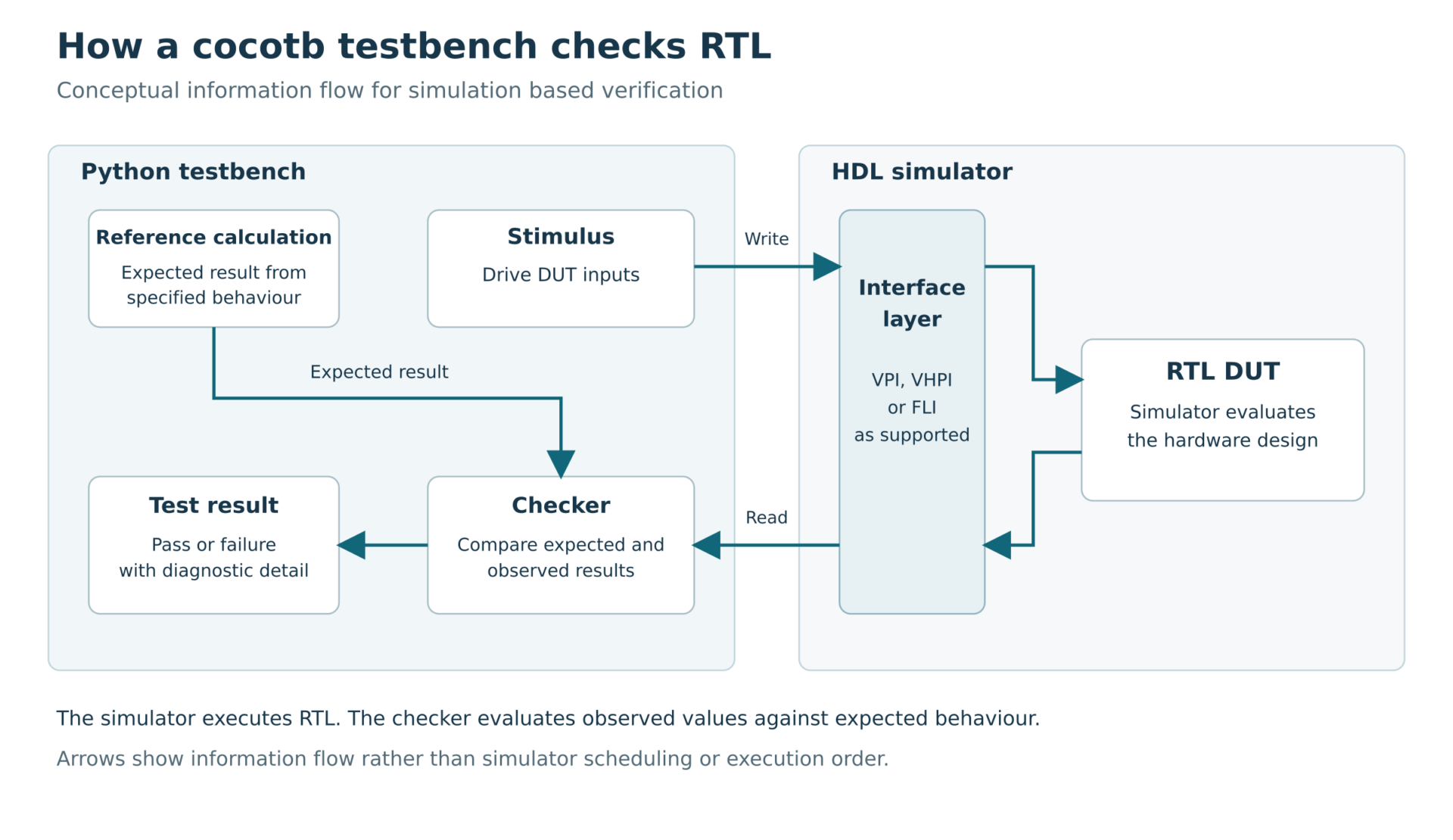
Figure 1. Conceptual cocotb testbench showing Python stimulus and checking connected to a simulated RTL DUT through a supported simulator interface. The expected result is derived from specified behaviour. Arrows show information flow, not a prescribed scheduling sequence; interface support varies by simulator.
Python coroutines and simulation time
A cocotb test is normally an asynchronous Python function marked with @cocotb.test(). Waiting on a trigger with await suspends that coroutine until the relevant simulation condition occurs. cocotb.start_soon() schedules another coroutine, allowing activities such as clock generation, stimulus and monitoring to progress concurrently within the testbench. [2, 3] Concurrency here describes coordinated simulation activities. It does not mean that each coroutine runs on its own CPU core. Likewise, Timer(1, unit="ns") advances the test's position in simulation time; it does not mean the computer completes the operation in one nanosecond.
Simulator and environment requirements
cocotb needs a compatible HDL simulator. Official documentation lists Icarus Verilog, Verilator and commercial simulators, including tool-specific limitations. Language support, signal visibility and available features depend on the simulator and version. Confirm these details before selecting a project configuration. [4] Record the Python, cocotb and simulator versions together with build arguments and dependencies. This article uses the versioned cocotb 2.0.1 documentation for reproducible API references; it does not claim that this is the newest release. Consult the matching cocotb docs when reproducing the example, and check release notes before changing versions.
A simple cocotb Python testbench example
This example checks a combinational unsigned adder. Each input is four bits, so its legal values are 0 to 15. The five-bit output preserves the carry: the largest expected result is 30. There is no clock, reset, pipeline or handshake in this design.
Define the RTL and expected behaviour
Save the following as adder.sv. The explicit zero extension makes the intended five-bit addition clear.
`timescale 1ns/1ps
module adder (
input logic [3:0] a,
input logic [3:0] b,
output logic [4:0] sum
);
assign sum = + ;
endmodule
The checker derives its expected value from the stated unsigned-addition behaviour. It enumerates all 256 binary input pairs rather than relying on random sampling.
Write the Python test
Save the following as test_adder.py. The assertion checks the output and reports the inputs and expected result if a mismatch occurs.
import cocotb
from cocotb.triggers import Timer, ReadOnly
@cocotb.test()
async def checks_unsigned_addition(dut):
checked = 0
for a in range(16):
for b in range(16):
# Leave the previous read-only phase before driving.
await Timer(1, unit="ns")
dut.a.value = a
dut.b.value = b
# Allow this zero-delay combinational RTL to settle.
await Timer(1, unit="ns")
await ReadOnly()
actual = int(dut.sum.value)
expected = a + b
assert actual == expected, (
f"a=, b=: expected , got "
)
checked += 1
cocotb.log.info("Checked %d input pairs", checked)
The first timer moves to a later time step before the next input write. The second permits evaluation after stimulus, and ReadOnly() places the check at the end of that time step. Do not write signals immediately after ReadOnly() in the same time step. [5]
Build and run the test
Place this Makefile beside the two source files. It selects the design, Python test module and simulator using cocotb's documented Makefile flow. [6]
SIM ?= icarus
TOPLEVEL_LANG = verilog
VERILOG_SOURCES = $(CURDIR)/adder.sv
TOPLEVEL = adder
COCOTB_TEST_MODULES = test_adder
include $(shell cocotb-config –makefiles)/Makefile.sim
On a Linux environment with Python, GNU Make and a compatible Icarus Verilog installation available, create a virtual environment and run:
python3 -m venv .venv
. .venv/bin/activate
python -m pip install cocotb==2.0.1
cocotb-config –version
iverilog -V
make SIM=icarus
The Python package does not install the HDL simulator. Check the official prerequisites and simulator support notes if compilation or simulator loading fails. The Makefile flow produces results.xml, which can also be retained by a regression system. [4, 6] Example validation: this test passed using Python 3.12.4, cocotb 2.0.1 and Icarus Verilog 12.0 on Linux. It checked 256 input pairs in one test. As a checker sanity check, replacing addition with subtraction caused the test to fail at a=0, b=1. This result applies to the supplied example and configuration.
Understand what a passing result establishes
A pass checks the specified addition result for all binary input combinations at the selected observation points. It does not test unknown or high-impedance inputs, gate delays, physical timing or implementation on an FPGA. The two one-nanosecond waits are testbench scheduling choices for this zero-delay example, not a measured propagation delay. For a clocked DUT, define reset behaviour, transaction acceptance and output latency before adapting the checker. A single arithmetic example cannot establish readiness for an unrelated interface or subsystem.
Benefits of Python for RTL verification
Python is useful when it reduces the distance between a requirement, a reference calculation and an automated check. A team can organise stimulus generators, monitors and scoreboards as reusable functions or classes, and use numerical libraries where appropriate. Reference models need their own review. Check signedness, bit widths, rounding, saturation and overflow explicitly when translating a Python calculation to finite-width hardware behaviour. For example, the adder above preserves a carry; changing the specification to a four-bit wrapping sum would require a different expectation. Reusable components should have clear interface contracts. Record whether a monitor reports attempted requests or accepted transactions, how it handles reset and how a scoreboard matches responses to requests. These decisions determine whether a test detects the intended failure. For a separately attributed implementation perspective, Alpinum's Semify article on functional verification with cocotb discusses that presentation's workflow. The introductory example here is independent of Semify's implementation.
cocotb vs UVM
cocotb and UVM provide different foundations for simulation-based verification. UVM supplies a standardised methodology and SystemVerilog class library for reusable verification environments; cocotb supplies Python access to an HDL simulation and coroutine scheduling. Existing verification assets and team requirements should guide the choice. [1, 7]
| Consideration | cocotb | SystemVerilog and UVM |
| Testbench implementation | Python tests and reusable Python components | SystemVerilog classes organised using UVM methodology |
| Reference calculations | Direct use of suitable Python models and libraries | Models implemented in SystemVerilog or connected through an integration interface |
| Existing verification assets | Review Python components, extensions and simulator integration | Review available UVM agents, sequences, register models and verification IP |
| Coverage planning | Plan functional coverage and simulator-specific RTL coverage explicitly | Plan SystemVerilog coverage and checking within the UVM environment |
| Selection criteria | Python integration, maintainability and required capabilities | Existing methodology, reusable assets and required capabilities |
This is a comparison of engineering considerations, not a performance benchmark. Neither choice makes tests correct automatically. A mixed environment may be possible, but coordination, ownership and simulator interfaces need deliberate integration. For the methodology behind agents, sequences and scoreboards, see Alpinum's guide to UVM architecture and verification.
Practical limitations and common mistakes
Sampling signals before the intended result is available
Waiting for RisingEdge(dut.clk) identifies a clock value change; it does not by itself establish that downstream RTL has finished evaluating. For a check intended to observe the settled result of that edge, an appropriate later phase such as ReadOnly() may be needed. First decide whether the requirement refers to the value before the edge, after evaluation or several cycles later. [5] Do not apply a timer delay blindly to every interface. A latency contract, handshake or clocked monitor should determine when a real transaction is checked. Record the observation point so another engineer can review whether the monitor samples the required behaviour.
Confusing coverage with correctness
Python code coverage concerns execution of the Python testbench. RTL code coverage concerns execution or activity in the HDL model, as measured by the chosen tool. Functional coverage records scenarios defined by the verification plan. These are different forms of evidence. For a FIFO, useful planned scenarios might include reset while occupied, full and empty boundaries, and simultaneous push/pop requests under the specified acceptance policy. A hit on a bin does not establish that the expected output was checked. Review the checker and the sampling condition alongside each important coverage goal.
Assuming Python makes every simulation faster
Python can simplify modelling and test development, but runtime depends on the simulator, design, signal access and testbench workload. Measure representative runs before promising a speed improvement. Compare equivalent checks and configurations, and include debugging and maintenance effort when evaluating the overall workflow.
Treating a regression pass as complete verification
Retain the source revision, dependency versions, simulator configuration and test selection with regression results. Preserve random seeds when randomness is used. Distinguish an assertion failure from a build error, missing test or timeout; each needs a different investigation. Logging an error message alone does not necessarily fail a cocotb test. [8]
Using cocotb in a regression and CI workflow
cocotb's Makefile flow generates machine-readable test results suitable for a CI system. The project still needs to configure build steps, failure handling and artefact retention. [6] For an initial integration, run a known passing test and a deliberately failing checker to establish that the pipeline reports both outcomes correctly. Keep that check separate from the production test suite. Archive useful logs and selected waveforms, and confirm that the CI job does not silently succeed when compilation fails or no intended test runs. Decide which tests run on every change and which need a longer scheduled regression. Use the same recorded configuration when reproducing a failure locally. This creates a practical connection between a passing report and the exact test configuration that produced it.
Updating older cocotb testbenches
Older examples may use APIs that differ from cocotb 2.x. The migration guide recommends resolving earlier deprecations before moving to 2.0 and rerunning the testbench from a known-good baseline. Relevant changes include replacing cocotb.fork() with cocotb.start_soon() and reviewing logic-value handling where Logic and LogicArray replace older BinaryValue usage. [9] Update a small representative test first. Review scheduling, task lifetime and value conversion rather than assuming a successful import demonstrates equivalent behaviour. Keep the old results and configuration available for comparison during the migration.
Building verification capability beyond the first test
The next step after a working cocotb testbench is a verification plan that connects requirements to stimulus, checking and coverage. Review one representative block before scaling the environment: can the team explain its assumptions, reproduce its failures and identify which requirements remain unchecked? Explore Alpinum's verification training programmes to identify a learning route suited to your team. For engineers working in SystemVerilog/UVM environments, Design Verification Training with SystemVerilog and UVM develops the underlying methodology.
Frequently asked questions
Is cocotb a simulator?
No. It provides a Python testbench environment connected to an HDL simulator. The simulator builds and executes the hardware design. Choose a supported simulator and check its specific configuration requirements. [1, 4]
Can cocotb test both FPGA and ASIC RTL?
Yes, subject to the HDL features, libraries and simulator support required by the design. The Python testbench checks simulated behaviour; it does not replace implementation timing analysis or testing of physical hardware.
Does cocotb replace UVM?
It can provide an alternative foundation for some verification environments. Whether to use it alongside or instead of an existing UVM environment depends on required capabilities, available verification assets and integration costs. Assess a representative workload before deciding.
Where should I start with the cocotb docs?
Use the quickstart for the version you installed, then read the timing model and your simulator's support notes. When following an older Python cocotb example, check the migration guide before copying deprecated APIs. [2, 4, 5, 9]
References
Primary technical references checked on 1 November 2026. Versioned documentation is used to keep the example and API guidance consistent. [1] cocotb contributors. Welcome to cocotb's Documentation. Version 2.0.1. Sections What is cocotb and How does cocotb work. Read source [2] cocotb contributors. Quickstart Guide. Version 2.0.1. Creating a test and running the example. Read source [3] cocotb contributors. Coroutines and Tasks. Version 2.0.1. Read source [4] cocotb contributors. Simulator Support. Version 2.0.1. Check the notes for the simulator in use. Read source [5] cocotb contributors. The Timing Model. Version 2.0.1. Values Change and End of Time Step. Read source [6] cocotb contributors. Makefile-based Build System and Test Runner. Version 2.0.1. Read source [7] Accellera Systems Initiative. Download UVM Standard Universal Verification Methodology. Standards and reference implementations. Read source [8] cocotb contributors. Writing Testbenches. Version 2.0.1. Logging and passing and failing tests. Read source [9] cocotb contributors. Upgrading to cocotb 2.0. Version 2.0.1 documentation. Read source

Written by : Mike Bartley
Mike started in software testing in 1988 after completing a PhD in Math, moving to semiconductor Design Verification (DV) in 1994, verifying designs (on Silicon and FPGA) going into commercial and safety-related sectors such as mobile phones, automotive, comms, cloud/data servers, and Artificial Intelligence. Mike built and managed state-of-the-art DV teams inside several companies, specialising in CPU verification.
Mike founded and grew a DV services company to 450+ engineers globally, successfully delivering services and solutions to over 50+ clients.
Mike started Alpinum in April 2016 to deliver a range of start-of-the art industry solutions:
Alpinum AI provides tools and automations using Artificial Intelligence to help companies reduce development costs (by up to 90%!) Alpinum Services provides RTL to GDS VLSI services from nearshore and offshore centres in Vietnam, India, Egypt, Eastern Europe, Mexico and Costa Rica. Alpinum Consulting also provides strategic board level consultancy services, helping companies to grow. Alpinum training department provides self-paced, fully online training in System Verilog, UVM Introduction and Advanced, Formal Verification, DV methodologies for SV, UVM, VHDL and OSVVM and CPU/RISC-V. Alpinum Events organises a number of free-to-attend industry events
You can contact Mike (mike@alpinumconsulting.com or +44 7796 307958) or book a meeting with Mike using Calendly (https://calendly.com/mike-alpinum-consulting).
Stay Informed and Stay Ahead
Latest Articles, Guides and News
Explore related insights from Alpinum that dive deeper into design verification challenges, practical solutions, and expert perspectives from across the global engineering landscape.